
TestNG Hello World Example
By:Roy.LiuLast updated:2019-08-17
A classic example, show you how to get started with TestNG unit test framework.
Tools used :
- TestNG 6.8.7
- Maven 3
- Eclipse IDE
1. TestNG Dependency
Add TestNG library in the pom.xml.
pom.xml
	<dependency>
		<groupId>org.testng</groupId>
		<artifactId>testng</artifactId>
		<version>6.8.7</version>
		<scope>test</scope>
	</dependency>
2. TestNG Example
Review a simple class, has a method to return a fixed email “feedback@yoursite.com”.
RandomEmailGenerator.java
package com.mkyong.testng.project.service.email;
import org.springframework.stereotype.Service;
public class RandomEmailGenerator {
	public String generate() {
		return "feedback@yoursite.com";
Create a test case like this :
TestHelloWorld.java
package com.mkyong.testng.examples.helloworld;
import org.testng.Assert;
import org.testng.annotations.Test;
import com.mkyong.testng.project.service.email.RandomEmailGenerator;
public class TestHelloWorld {
	@Test()
	public void testEmailGenerator() {
		RandomEmailGenerator obj = new RandomEmailGenerator();
		String email = obj.generate();
		Assert.assertNotNull(email);
		Assert.assertEquals(email, "feedback@yoursite.com");
Done, a simple TestNG test case is created, this test make sure the RandomEmailGenerator.generate() is always returns “feedback@yoursite.com”.
3. TestNG Eclipse Plug-In
To run above test in Eclipse IDE, you need to install TestNG Eclipse plug-in. Follow this official TestNG Eclipse plug-in guide for the installation.
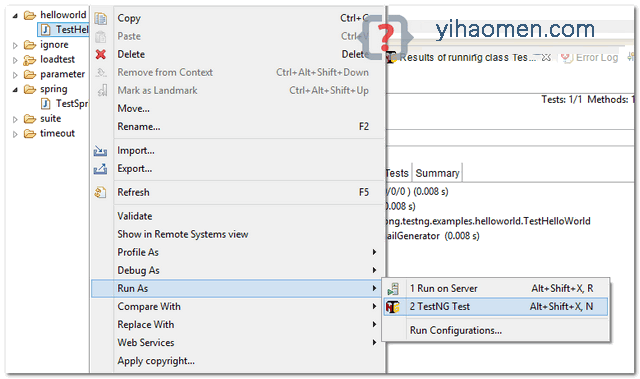
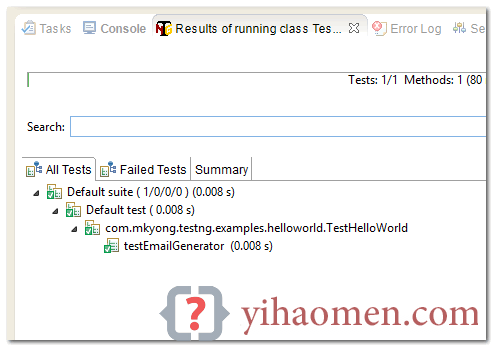
To run TestNG test, right click on the test class and run as “TestNG Test”.
Result
References
From:一号门
Previous:Java Custom Annotations Example
COMMENTS